Night shifts can now be logged as a single working day… or not. You decide!

If your company has teams that work at night and take breaks that cross midnight, the system may have occasionally interpreted a single shift as two separate working days. For example, a clock in at 22:00, a break, and a clock in again at 02:00.
With the new night shift configuration, you can now decide how those clock ins/outs are consolidated to reflect the reality of your operation.
What can you do with night shifts? ⚙️
-Choose how night-time clock ins/outs are counted
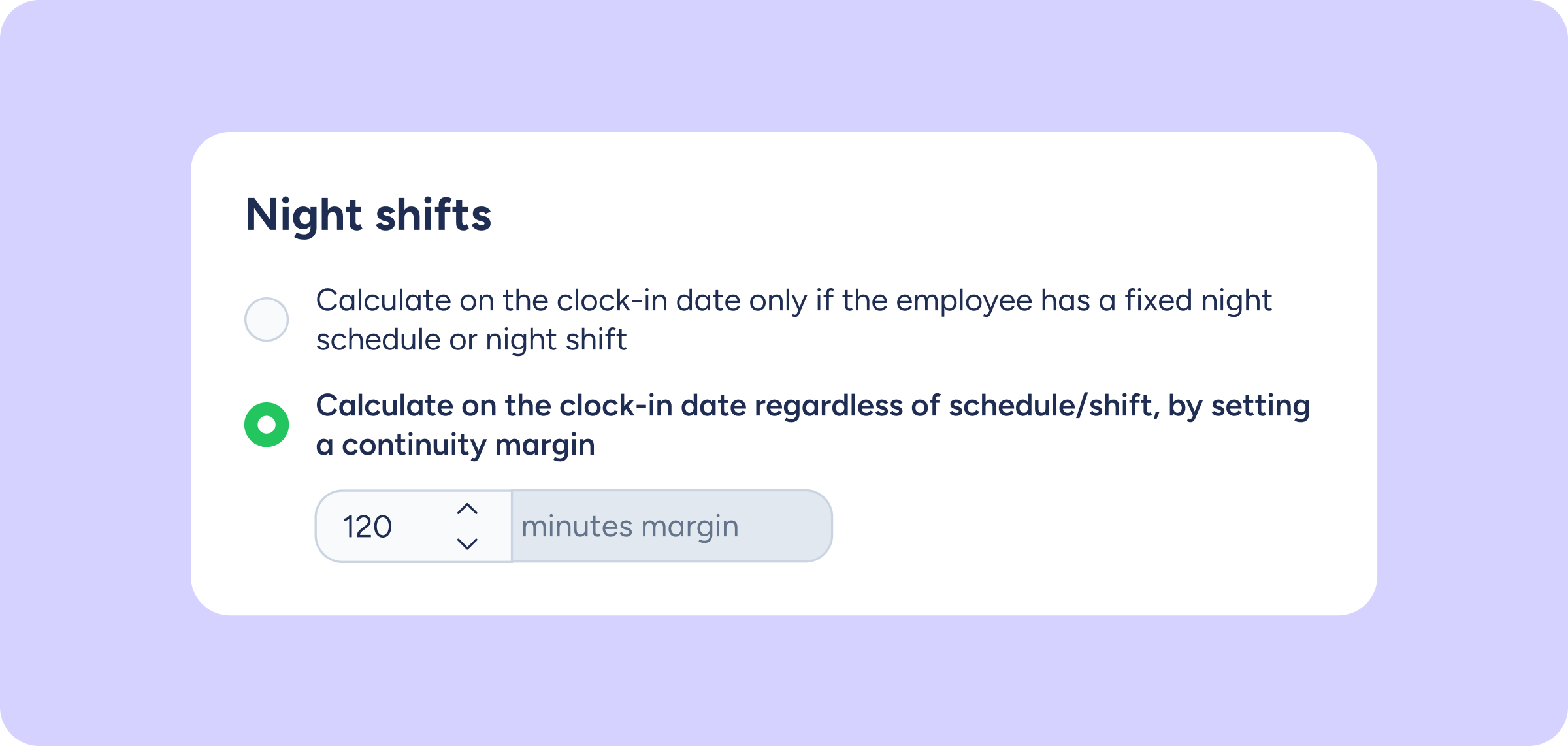
Configure how clock ins/outs that cross midnight are calculated according to your company’s needs. You can:
- Count the entire working day on the clock-in date.
- Define a custom time margin.
- Split the hours between the days involved.
-Avoid duplicate or incorrect clock ins/outs
When an employee resumes their shift after a night-time break, the system recognises it’s still the same working day and avoids generating separate clock ins/outs.
–Apply it only where it’s needed
This setting only affects employees with flexible schedules and night shifts. Employees with fixed shifts will not be affected.
Please note 📋
- This setting is disabled by default and does not change your account’s behaviour until you enable it.
- You can enable it from Advanced configuration >> Night shifts.
- The setting only applies to clock ins/outs made in real time. Manual edits to clock ins/outs are not affected.
Does your company have teams that work at night? Go to Advanced configuration and set them up in just a few clicks.