Sound familiar? You have 80 candidates for a vacancy, the job description is well written, and yet you feel like you’re searching in the dark. You review CVs one by one, dig through old spreadsheets, open a dozen tabs to post on three different job boards… and the perfect candidate might be right there, buried among the rest.
The new Advanced Recruitment Add-on brings 4 AI-powered tools that take on the heavy lifting for you: writing job offers, screening CVs, filtering candidates, and accepting applications without leaving WhatsApp. All within the same workspace you already know, with a redesigned interface that makes every action faster and clearer.
Same tool, same data… but with an intelligent layer that’s going to save you a lot of hours (and headaches). Shall we explore it together?
AI at the heart of the process
Four new features that take care of the work that takes up most of your time — so you can get back to what matters: talking to people. Here’s everything included in the new Advanced Recruitment Add-on:
✍️ Draft job offers with AI
Writing a job offer that truly reflects your company takes time. And what works for one role often doesn’t work for another.
The job offer writing assistant generates a complete offer from the job title alone. But that’s not all. The AI analyzes your vacancy history to identify patterns in language, tone, and structure. Drawing on that learning, it generates new offers that stay consistent with your employer brand. What used to take an afternoon now takes a coffee break.
- Learns your company’s style. The AI analyzes your previous offers to understand how your company communicates: formal or approachable, technical or generalist, culture-first or responsibilities-first.
- Generates the offer in seconds. Enter the role, and the AI drafts a proposal aligned with your brand voice. You review and adjust whatever you need.
- Consistency across your employer brand. All your offers speak with the same voice, regardless of who writes them or when.
🎯 Compatibility score
Recruiters spend between 6 and 10 minutes analyzing a single CV. With more than 100 candidates, that’s up to 15 hours per vacancy. And yet over 60% of candidates rejected at the first stage could have been good options.
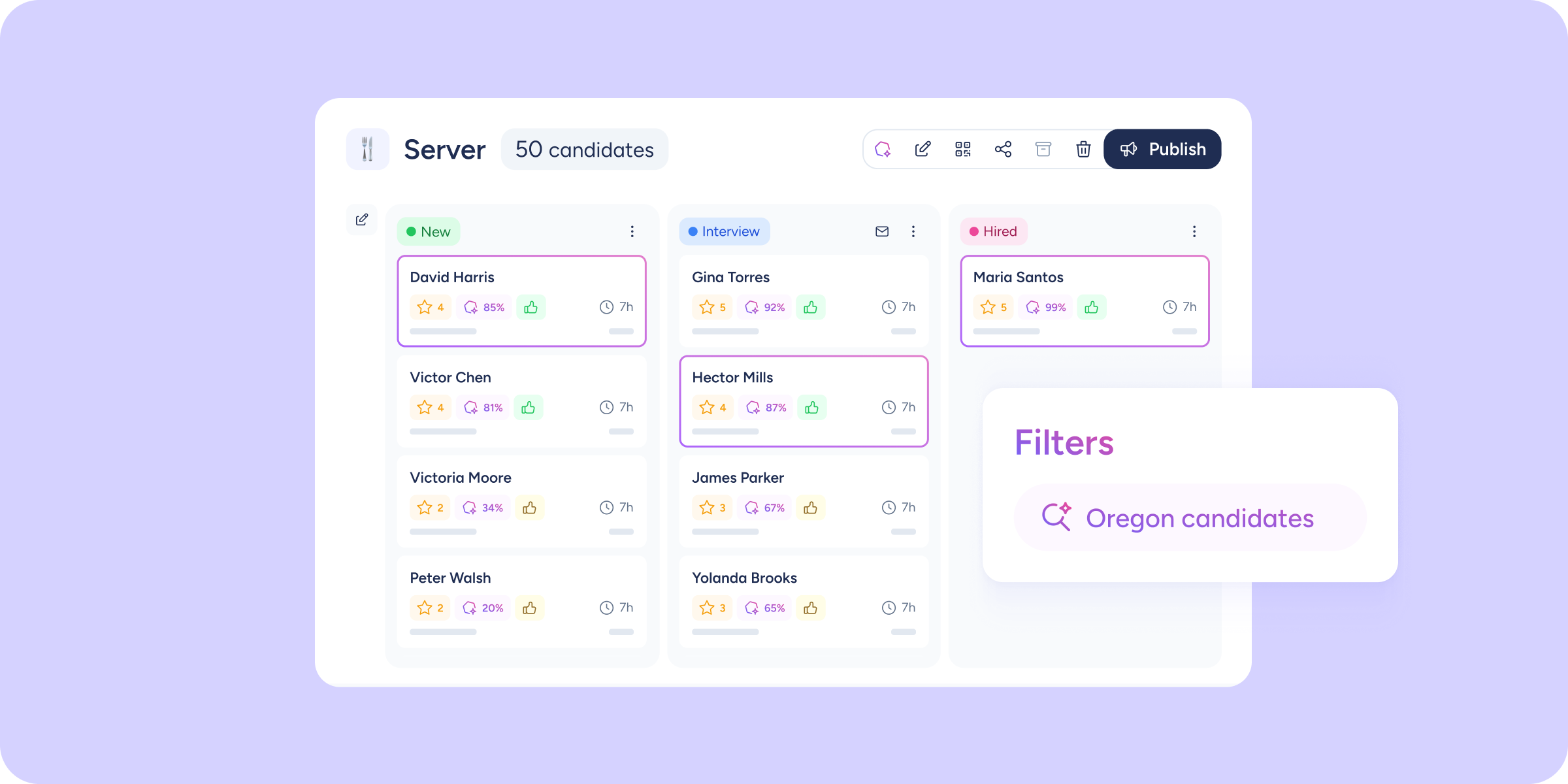
The Compatibility score analyzes each candidate’s CV against the job description and assigns a match percentage. You can also configure additional criteria to fine-tune the matching to the specific needs of each role.
Filter and sort by score, and in their profile, you’ll find an analysis covering skills, education, a final recommendation, and a summary.
- Automatic score for every candidate. The AI cross-references the CV with the job description and shows a compatibility percentage. No manual criteria, no subjectivity.
- Custom criteria. Add specific guidelines so the AI prioritizes what matters most for each vacancy.
- Enable it whenever you like. You can enable or disable the score at any time, when creating the vacancy or from the detail view. It’s your call.
- Ranked pipeline view. Sort candidates by compatibility. Start with the most relevant ones and make better decisions.
🔍 Smart filter
Search and filters fall short when a candidate has described what you’re looking for differently. For example, if you search for “experience managing remote teams” and the CV says “led a distributed team across 4 countries”, that candidate won’t show up.
The Smart filter lets you search in natural language; it understands the meaning of what you’re saying, not just the words you use. And it searches candidate data across the vacancy pipeline, the candidate database, and Talent Pools.
- Natural language search. Write what you’re looking for as you’d explain it to a colleague: “Someone with retail experience and advanced English.”
- Analyzes all content. Not just the CV. The filter also searches notes, questionnaire responses, and attached documents. Nothing gets missed.
📲 WhatsApp Apply
79% of people use WhatsApp every day. Your candidates do too. So why ask them to fill in a 10-question form when they can apply from where they already are?
With WhatsApp Apply, you can generate a QR code or a URL and share your vacancies however you like, for example, on a poster on your shop door. An AI bot chats with your candidates on WhatsApp: it gathers the information, validates their interest, and creates their full profile in Sesame. You can choose from 3 tones: formal, approachable professional, or modern.
- Frictionless application. Candidates don’t need to create an account or remember passwords. Just scan and reply.
- AI bot. The WhatsApp conversation guides the candidate, validates their interest, and collects the necessary information.
- Complete profile in Sesame. When the candidate finishes the conversation, their profile appears in Sesame with all the information collected.
Ideal for hospitality, retail, construction, and any other sector where candidates don’t always have a CV.
📡 Multiposting: one vacancy, multiple job boards, one click
How many tabs do you have open when you post a vacancy? Indeed, LinkedIn, Glassdoor, your own employment portal… copying and pasting the same description over and over, managing different logins, and then trying to consolidate candidates from every source.
With Multiposting, you select the vacancy, choose the job boards you want to post to, and everything goes out at once. No logging into each platform, no duplicating descriptions, no wasted time. All from a single flow within Sesame.
- External job boards in one flow. Select which job boards to send your vacancies to: LinkedIn, Indeed, Glassdoor, and Google Jobs, among others.
- Unified view. From each vacancy’s profile, you can see which job boards the vacancy has been sent to, which ones require prior configuration, and which ones are inactive.
- Job board management. Enable or disable job boards individually, without leaving Sesame and without logging into each platform separately.
🎨 Customizable careers portal
Adapt your employment portal to your brand identity: logo, brand color palette, header image, welcome text, “About us” section, and company contact details. To win over talent from the very first click, without relying on external job boards.
How to activate Advanced Recruitment
Advanced Recruitment is an Add-on available for HR Starter, HR Professional, and HR Enterprise plans (check price). What’s included?
- Draft job offers with AI
- Compatibility score
- Smart filter
- WhatsApp Apply
- Multiposting
- Employment portal customization.
An intelligent layer deserves an interface to match
If you’re already using Recruitment, you’ll notice some changes when you log in. We’ve rethought (and redesigned) the interface to simplify the most-used flows, reduce cognitive load, and make room for the new features, without turning the panel into a maze.
If you’ve ever thought “this should be easier”, you’re going to love what’s coming.
- Redesigned main view. The main panel has a new visual layout: cleaner, clearer, with direct access to the most-used actions.
- Vacancy view. Kanban-format pipeline with candidates, AI score, evaluations, and time in each stage. Filters and search powered by AI.
- Unified posting. The vacancy posting process now integrates all job boards into a single flow. Fewer steps, more power.
- Job board configuration. From “Configuration”, manage your own careers portal and external job boards: Indeed, Glassdoor, Multiposting, WhatsApp Apply.
⚠️ Important: the redesign primarily affects navigation and posting flows. Your vacancies, candidates, templates, and configurations are exactly where you left them. If anything feels unfamiliar in the first few days, check the Help Center.
Recruiting no longer means reviewing CVs one by one, writing job offers from a blank page, and posting vacancies one at a time. Today, AI handles all of that. And you get back to what matters: talking to people.